
Screenshots

App details
- Updated
- Jul 9, 2025
- Language
- Chinese 11 moreLanguagesChineseCzechDutc...
- Developer
- xrecode.com
- Category
- Mobile
SoftPas in:
This product is also available in the following languages:
About XRecode II
Download XRecode II – Audio Converter, Free Audio Converter, Convert Audio Files, MP3 Converter, Audio Format Converter, Batch Audio Conversion
Overview
XRecode II is a powerful audio conversion tool designed to simplify the process of transforming audio files across a wide range of formats. Built for users who frequently work with diverse audio content, it addresses the common challenge of format incompatibility by offering seamless conversion between nearly every major audio file type. Whether you're converting music from a CD, editing podcast recordings, or preparing audio for a multimedia project, XRecode II provides a reliable solution without requiring technical expertise.
The app is particularly suited for content creators, podcasters, students, and general users who manage large collections of audio files. Its focus on usability and performance makes it a valuable utility in the digital audio ecosystem. While the developer, XRecode, is not further detailed in available information, the application's consistent updates and robust feature set suggest a dedicated development effort. The tool’s ability to handle batch processing and operate efficiently in the background enhances productivity, making it ideal for users who need to convert multiple files quickly and without disruption to their workflow.
Real-world use cases include preparing audio for playback on different devices, archiving music collections in a preferred format, or converting audio from legacy formats to modern standards. By offering comprehensive format support and intuitive operation, XRecode II fills a critical gap in everyday digital audio management.
Key Features & Functionality
- Effortless Operation: Users can initiate conversions simply by dragging and dropping files or folders directly onto the interface. This eliminates the need for complex setup steps, enabling rapid processing even for beginners.
- Background Multitasking: The application runs efficiently in the background, allowing users to continue using their computer for other tasks without performance degradation. This is especially beneficial during bulk conversions.
- Customizable Settings: XRecode II offers granular control over conversion parameters, including output quality, encoding speed, and file naming. Users can also create and save custom profiles for different formats, streamlining future conversions.
- Wide-ranging Format Support: The software supports a broad spectrum of audio formats, including AAC, AC3, APE, CDA, CUE, FLAC, M4A, MP3, MP4, MPC, OGG, TTA, WAV, WMA, and WM. This ensures compatibility with virtually any audio source or destination.
- Batch Processing: Multiple files can be queued and converted simultaneously, significantly reducing time and effort when managing large audio libraries.
For example, a podcaster can drag a folder of raw WAV recordings into XRecode II, apply a preset for optimal podcast quality, and let the app convert all files to MP3 while they work on editing. Similarly, a music enthusiast can convert an entire CD collection from CDA to FLAC with minimal interaction, preserving audio quality and organization.
Interface, UX & Performance
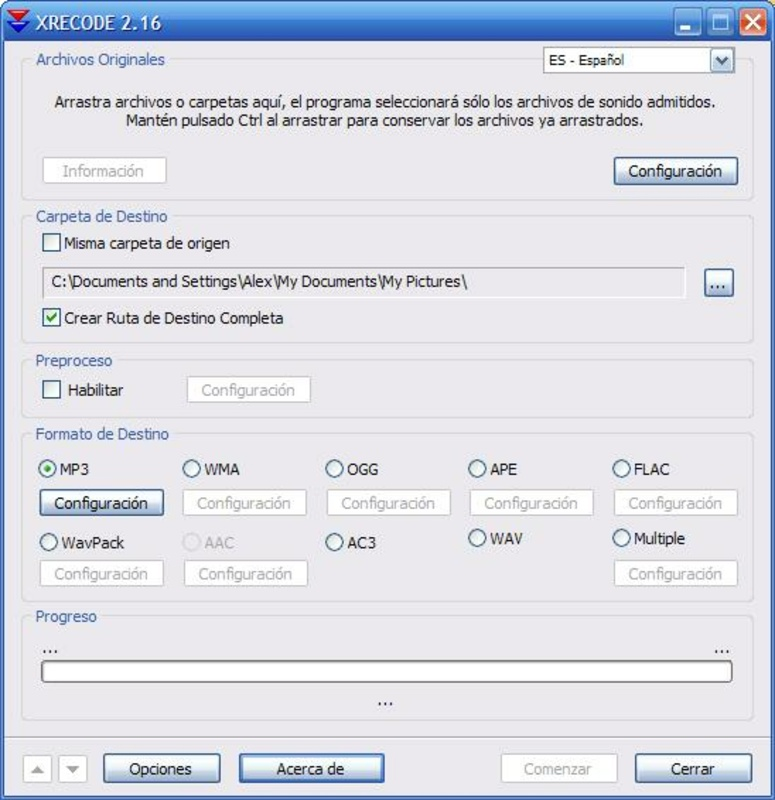
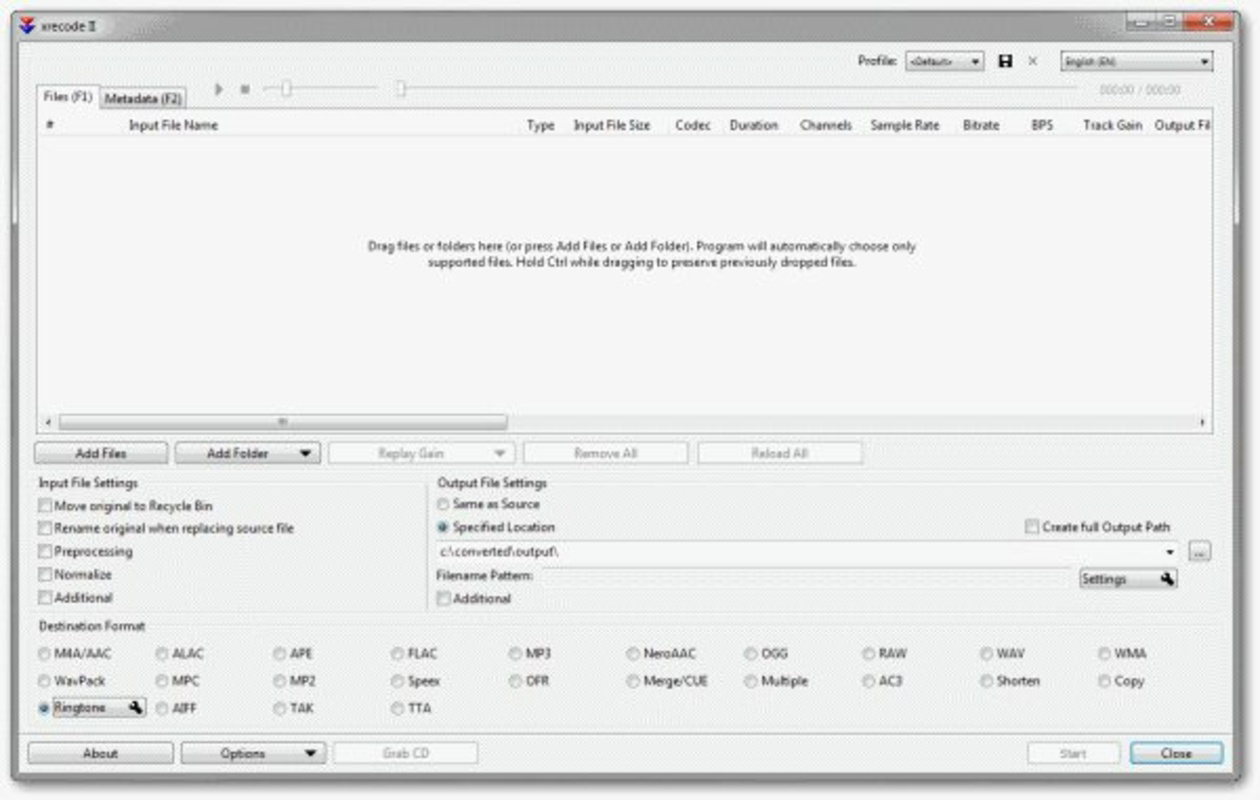
The user interface of XRecode II is clean, intuitive, and focused on functionality. The layout emphasizes accessibility, with clearly labeled sections for file management, conversion settings, and output control. Navigation is straightforward, relying on drag-and-drop mechanics and a visible queue system that displays progress and file status.
Visual design is minimalistic, avoiding clutter while maintaining essential controls within easy reach. The interface remains responsive even when processing large batches, indicating efficient resource management. Although the developer did not list formal performance metrics, the app’s ability to operate in the background without noticeable system slowdowns suggests optimized performance across different device categories.
Stability appears to be a strength, with consistent operation during extended conversion sessions. Users can expect reliable results without crashes or data loss. The application maintains a low memory footprint, which is particularly advantageous on systems with limited resources. Overall, the UX prioritizes speed, clarity, and control, aligning well with the needs of both novice and advanced users.
Platform Compatibility & Technical Requirements
XRecode II is available exclusively for Windows, making it accessible to users on desktop environments. The current version is 2.23, with a file size of 12.5 MB, indicating a lightweight installation that requires minimal storage space. The developer did not specify minimum OS requirements, so compatibility with specific Windows versions remains unconfirmed.
Given its small footprint and lack of resource-heavy dependencies, it is likely compatible with most modern Windows systems. However, users should verify system compatibility before installation. The app is free to download and use, removing cost barriers to entry and making it an accessible option for a broad audience.
Pros and Cons
Pros
- Free to download and use with no hidden costs
- Supports a wide range of audio formats, including rare and legacy types
- Intuitive drag-and-drop interface suitable for beginners
- Efficient background processing with minimal system impact
- Batch conversion capability for handling large numbers of files
- Customizable profiles for repeated tasks and consistent output
Cons
- Platform limited to Windows; no mobile or macOS version available
- Specific system requirements were not listed by the developer
- No built-in audio editing features beyond conversion
- Interface may feel outdated compared to modern design standards
- Support for advanced audio metadata (e.g., ID3 tags) was not detailed
FAQ
Is XRecode II safe to download and install?
Yes, XRecode II is a free tool that does not include malware or adware. It is distributed directly by the developer, ensuring a secure download experience.
Can I convert multiple audio files at once?
Yes, XRecode II supports batch conversion, allowing users to queue and process multiple files simultaneously, saving time and effort.
Does XRecode II work on macOS or mobile devices?
Currently, XRecode II is only available for Windows. There is no official version for macOS, iOS, or Android.
How do I update XRecode II?
Users should check the official website for the latest version. The developer regularly releases updates to improve compatibility and performance.
Can I customize the output quality and format?
Yes, XRecode II provides detailed settings for output quality, encoding speed, and file format selection. Users can also save custom profiles for reuse.
Final Thoughts
XRecode II stands out as a reliable, feature-rich audio converter that delivers on its promise of simplicity, speed, and versatility. Its ability to handle diverse formats, perform batch conversions efficiently, and operate in the background makes it a top choice for users managing large audio collections. While it is limited to Windows and lacks advanced editing tools, its core functionality is executed with precision and care.
For anyone needing a free, secure, and powerful audio conversion tool, XRecode II offers exceptional value. Whether you're a student converting lecture recordings, a podcaster preparing episodes, or a music lover digitizing old CDs, this app meets your needs without compromise.
Download XRecode II now
Guides & Tutorials
How to install XRecode II
- Click the Download button above.
- Once redirected, accept the terms and click Install.
- Wait for the XRecode II download to finish on your device.
How to use XRecode II
This software is primarily used for its core features described above. Open the app after installation to explore its capabilities.
User Reviews
No reviews yet. Be the first to share your experience.
You may also like
more
Que no te pillen¡
About !Que no te pillen¡Reviewed by Jason A. BilbreyShow MoreShow Less

3D Combat Zone
About 3D Combat ZoneOriginally released in 1983, 3D Combat Zone immerses players...

666: El día del portal
About 666: El día del portalOn June 6, 2006, Agent P. Stone uncovers a sinister...

80 in 1 Best Flash games
About 80 in 1 Best Flash games 80 in 1 Best Flash games is a collection of 80 fl...

ABYSS SEEKERーーWhat Do You See Deep in The Abyss
About ABYSS SEEKERーーWhat Do You See Deep in The AbyssIn ABYSS SEEKER, players...

ACA NEOGEO THE KING OF FIGHTERS 2002 for Windows
About ACA NEOGEO THE KING OF FIGHTERS 2002 for WindowsTHE KING OF FIGHTERS 2002,...